

Generate secrets fully offline
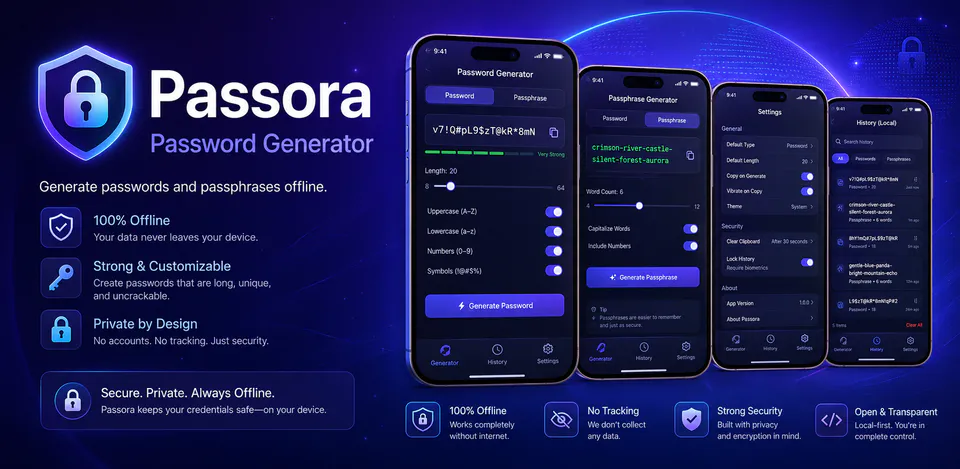
Passwords and passphrases are generated on the device so the core workflow does not depend on accounts, cloud sync, or online requests.

Security
Passora is built for people who want strong password and passphrase generation without sending secrets anywhere. It keeps generation on-device, offers optional local history, and focuses on a calm mobile experience that feels private by default.
Why Passora
Passwords and passphrases are generated on the device so the core workflow does not depend on accounts, cloud sync, or online requests.
Tune password length and character rules or create readable passphrases from a bundled word list inside the app.
Settings and optional history stay on the device, and users can clear local data at any time from inside the app.
An offline password generator with passphrase mode, strength guidance, and optional on-device history.

Android workflow
Open the app, adjust the rules you want, and copy a fresh password without stepping into a cloud-based workflow.
Passora screens


Passora quality
Passwords and passphrases are generated on the device so the core workflow does not depend on accounts, cloud sync, or online requests.
Passora privacy
Passora has a dedicated policy describing local storage, permissions, online services, account features, and deletion controls that apply to the product.
What’s new
Passora updates and fixes are shared here when release notes are available.
View all updates arrow_forwardTechnical information
Need help?
Include your device model, Android version, app version, and screenshots when possible.
Open supportEmail supportMore apps you might like

A retail catalog and inventory app for Jeaneth Store with customer browsing, cart flows, admin orders, and stock control.

A local Android sound toolkit for playback enhancement, equalizer presets, speaker checks, and private audio tests.

A precise Android metronome for tempo practice, tap tempo, beat setup, and background playback.