
Save signal spots by place
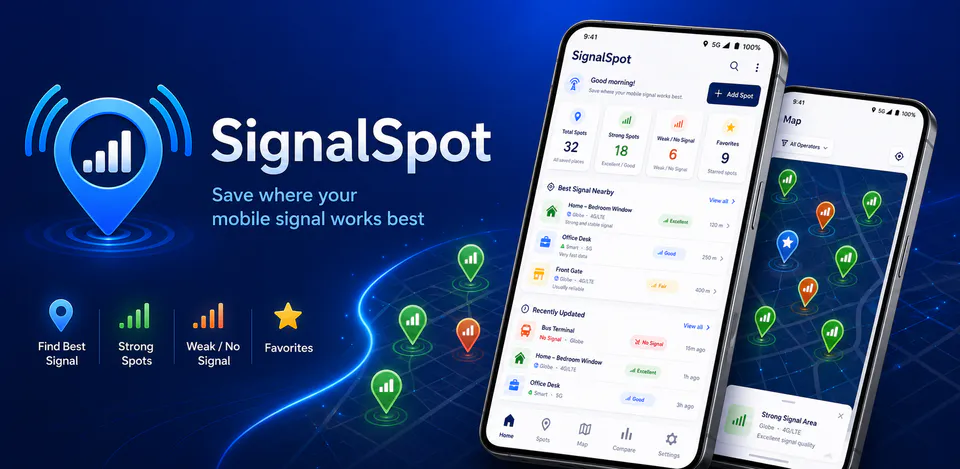
Record the area, carrier, network type, signal level, notes, tags, use cases, favorites, and check history for places you want to remember.

Utilities
SignalSpot is built for people who want a private, local way to remember where mobile signal works well, drops, or disappears. It keeps manual signal spots, optional saved coordinates, carrier and network details, travel notes, comparison views, reminders, and local import or export tools centered on the device instead of a cloud account.
Why SignalSpot
Record the area, carrier, network type, signal level, notes, tags, use cases, favorites, and check history for places you want to remember.
Use saved spots, local map views, carrier comparison summaries, and quick travel notes to plan where calls, messages, maps, or mobile data are more likely to work.
Keep data on the device, choose whether coordinates appear in exports, create JSON or CSV files, import local backups, and use optional device reminders for repeat signal checks.
A private signal-spot notebook with manual signal notes, optional local coordinates, carrier comparison, travel checks, reminders, and local JSON or CSV import/export.

Android workflow
Open SignalSpot to review saved spots, recent checks, favorite locations, and local reminder status without signing in.
SignalSpot screens


SignalSpot quality
Record the area, carrier, network type, signal level, notes, tags, use cases, favorites, and check history for places you want to remember.
SignalSpot privacy
SignalSpot has a dedicated policy describing local storage, permissions, online services, account features, and deletion controls that apply to the product.
What’s new
SignalSpot updates and fixes are shared here when release notes are available.
View all updates arrow_forwardTechnical information
Need help?
Include your device model, Android version, app version, and screenshots when possible.
Open supportEmail supportMore apps you might like

A retail catalog and inventory app for Jeaneth Store with customer browsing, cart flows, admin orders, and stock control.

A local Android sound toolkit for playback enhancement, equalizer presets, speaker checks, and private audio tests.

A precise Android metronome for tempo practice, tap tempo, beat setup, and background playback.