
All-in-one time suite
Keep clocks, alarms, timers, stopwatch sessions, and word clock views together in one consistent workflow.

Productivity
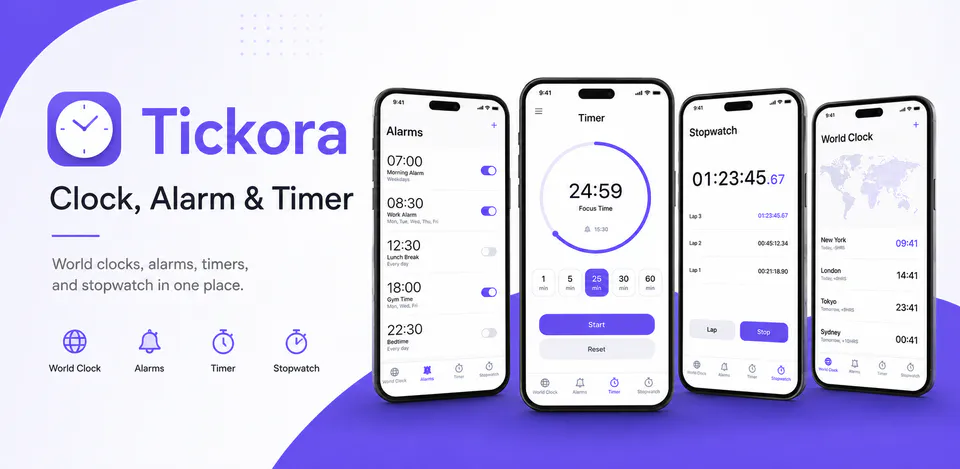
Tickora brings everyday time tools into one focused experience. It is built for people who want alarms, countdowns, stopwatch sessions, and glanceable time views without bouncing between separate apps.
Why Tickora
Keep clocks, alarms, timers, stopwatch sessions, and word clock views together in one consistent workflow.
Create a timer or alarm quickly without leaving the main experience or opening multiple apps.
Designed for quick repeat use, whether you are waking up, cooking, studying, or timing workouts.
An all-in-one time utility with a digital clock, alarms, timers, stopwatch tools, and a word clock.

Android workflow
Set up dependable alarm flows and keep everyday timing tasks close at hand.
Tickora screens


Tickora quality
Keep clocks, alarms, timers, stopwatch sessions, and word clock views together in one consistent workflow.
Tickora privacy
Tickora has a dedicated policy describing local storage, permissions, online services, account features, and deletion controls that apply to the product.
What’s new
Tickora rebuilt World Clock, Alarm, Stopwatch, and Timer for a faster native experience, with improved alarm reliability, notifications, snooze behavior, lock-screen alerts, tablet support, dark mode support, and automatic migration for existing alarms and world clocks.
View all updates arrow_forwardTechnical information
Need help?
Include your device model, Android version, app version, and screenshots when possible.
Open supportEmail supportMore apps you might like

A retail catalog and inventory app for Jeaneth Store with customer browsing, cart flows, admin orders, and stock control.

A local Android sound toolkit for playback enhancement, equalizer presets, speaker checks, and private audio tests.

A precise Android metronome for tempo practice, tap tempo, beat setup, and background playback.