
Start with guided hydration setup
Aqualune onboards users with daily-goal choices, a custom goal option, and a lightweight profile name so the app feels personal from the first session.

Health
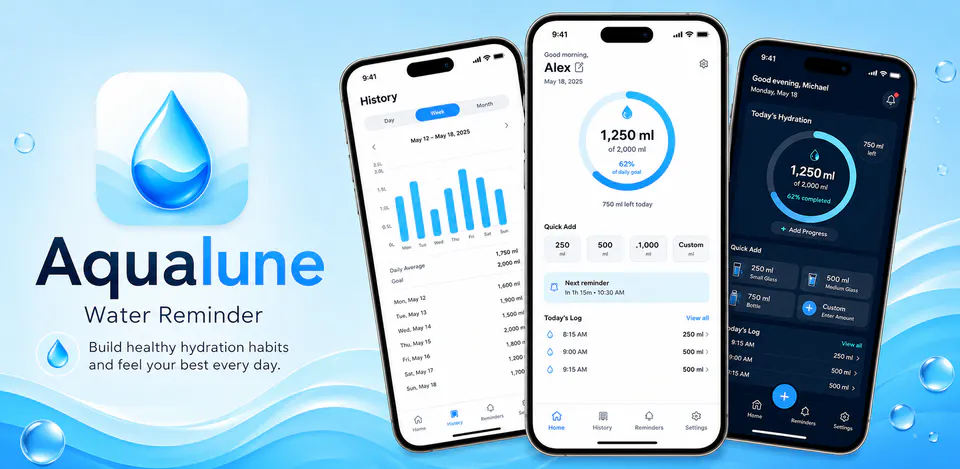
Aqualune is built to make hydration tracking feel softer and easier to revisit throughout the day. The reviewed project combines guided onboarding, quick-add water logging, reminder windows, reusable cup presets, simple history views, and local data export while keeping the core experience centered on data stored on your device.
Why Aqualune
Aqualune onboards users with daily-goal choices, a custom goal option, and a lightweight profile name so the app feels personal from the first session.
The reviewed project supports quick-add actions, reusable cup presets, custom cup editing, and manual intake entry so repeat logging stays fast.
Daily logs, reminder windows, appearance preferences, language settings, and exported JSON summaries are all structured around local device storage instead of an account-based service.
A local-first water tracking app with onboarding, custom cups, reminder schedules, intake history, and exportable summaries.

Android workflow
Move through onboarding, choose a hydration target, and begin the day with a quick water entry from the home screen.
Aqualune screens


Aqualune quality
Aqualune onboards users with daily-goal choices, a custom goal option, and a lightweight profile name so the app feels personal from the first session.
Aqualune privacy
Aqualune has a dedicated policy describing local storage, permissions, online services, account features, and deletion controls that apply to the product.
What’s new
Aqualune updates and fixes are shared here when release notes are available.
View all updates arrow_forwardTechnical information
Need help?
Include your device model, Android version, app version, and screenshots when possible.
Open supportEmail supportMore apps you might like
A retail catalog and inventory app for Jeaneth Store with customer browsing, cart flows, admin orders, and stock control.

A local Android sound toolkit for playback enhancement, equalizer presets, speaker checks, and private audio tests.

A precise Android metronome for tempo practice, tap tempo, beat setup, and background playback.